
In many buying conversations about ai agents for business, the core question is simpler: “Can software handle this?” Often, yes. But moving from a chatbot to a task-completing agent usually takes added engineering, security, and integration work. Pick the wrong platform and you lose months.
This guide cuts through the noise. You’ll leave with a clear shortlist that fits your use case, realistic costs, and a 30-day pilot plan that produces a measurable number. Straight talk, not feature lists dressed up as strategy.
What AI agents actually are (and what makes them different)
How ai agents for business operate in practice
A chatbot answers questions. An AI agent completes tasks. One sends a reply; the other updates your CRM, sends a follow-up email, books a calendar slot, and logs the interaction without anyone touching a keyboard. Agents use a model for reasoning, memory to track context across a session, and tools to take actions inside your connected systems.
Where they sit in your stack matters. A well-built agent connects through your existing AI agent integrations: CRM, helpdesk, calendar, ecommerce, WhatsApp, email, Slack. It isn’t a separate product bolted on the side. It runs through the same channels your customers already use and feeds data back into the same records your team relies on.
A production-grade agent also needs guardrails, a defined escalation path, and measurable KPIs from day one (see OWASP and similar agentic security guidance). A practical standard includes high-availability targets, brand-consistent tone, and a clean handoff to a human when needed. Training on your products, pricing, and sales process is what separates an agent that converts from one that frustrates.
What they can automate across your customer funnel
Support use cases and outcomes
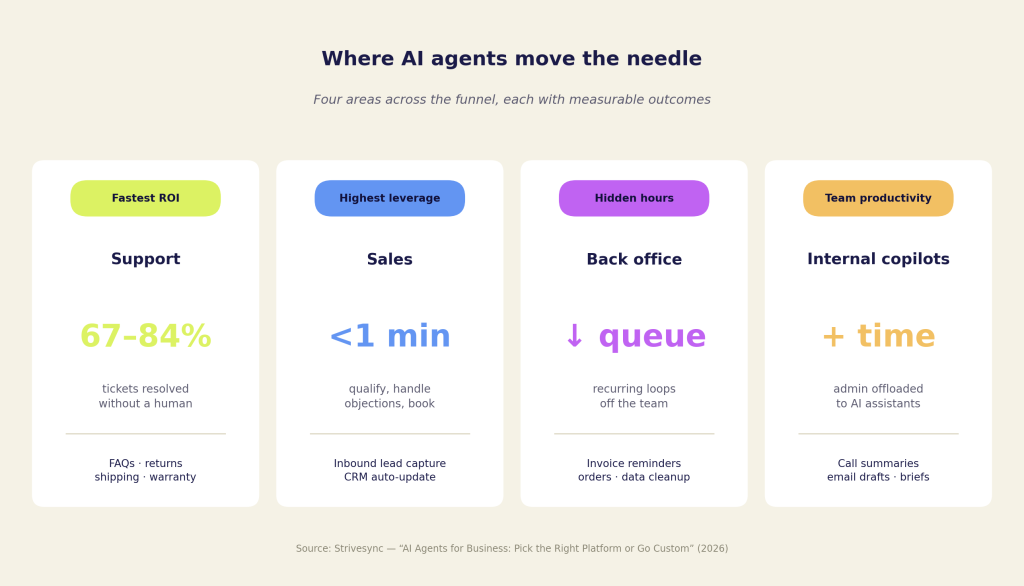
Customer support is the fastest path to ROI. Published case studies report AI agents resolving roughly 67 to 84 percent of support interactions without human involvement, with cost per ticket often an order of magnitude lower than manual handling. FAQs, returns, shipping queries, and warranty claims are the easy wins. Tiered routing handles the exceptions.
Sales and lead handling
Sales qualification is where results compound. Responding to inbound leads within five minutes materially improves connect rates. Most teams don’t get there consistently. An AI agent captures the lead, asks qualifying questions, handles common objections, and books a meeting, often in under a minute. The CRM updates automatically. No spreadsheet, no manual entry, no dropped weekend leads.
Back office and internal workflows
Back-office loops are quieter wins but important ones. Order status checks, invoice reminders, inventory updates, and data cleanup consume hours of ops time every week. Agents handle the volume, reduce the ticket queue, and let your finance and operations people focus on the work that requires judgment.
AI assistants and copilots for teams
Internal AI assistants for teams deserve a mention too. Summarizing sales calls, drafting follow-up emails, and prepping meeting briefs add up fast. Offloading these to AI copilots for business gives your team more time to close deals and deliver work, not manage admin.
Agents vs chatbots vs RPA: the honest comparison
Where ai agents for business fit alongside RPA
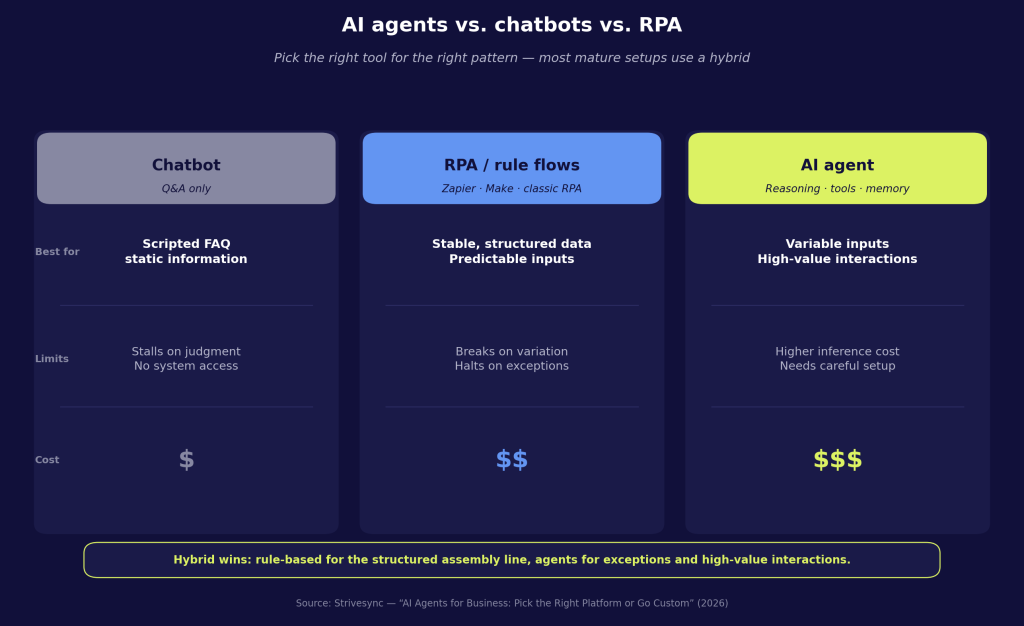
Rule-based automation tools like Zapier, Make, and traditional RPA are excellent when your processes are stable and your data is structured. They’re predictable, low-variance, and cheap to run at scale. If a form always looks the same and the output always goes to the same place, a rule-based flow handles it without complaint.
Problems start when the world changes. A new field in a form, an unstructured email, an exception that doesn’t fit the ruleset, traditional automation halts or misroutes. Independent evaluations consistently find that well-configured agents outperform on variable layouts and reduce time to resolution versus rule-based systems. Those advantages come from reasoning over ambiguous inputs, tool use, and memory, not marketing spin.
Intelligent AI agent platforms handle multi-step tasks, manage context across a conversation, and adapt when conditions shift. The tradeoff is cost and complexity. Model inference isn’t free, and more capable agents require more careful setup. The hybrid approach most mature operations use: rule-based flows for the structured assembly line; autonomous agents for business exceptions and high-value interactions.
Security deserves plain talk. Granting an agent write access to your CRM or billing system is a real risk if permissions aren’t scoped correctly. Prompt injection, over-broad credentials, and inadequate audit trails are common failure modes. The right answer is least-privilege permissions, SSO, RBAC, and monitoring aligned to OWASP-style agentic AI threats analyses. Any platform you evaluate should show how they address these requirements.
Picking a platform: quick shortlist by use case
No-code agent builders for SMBs
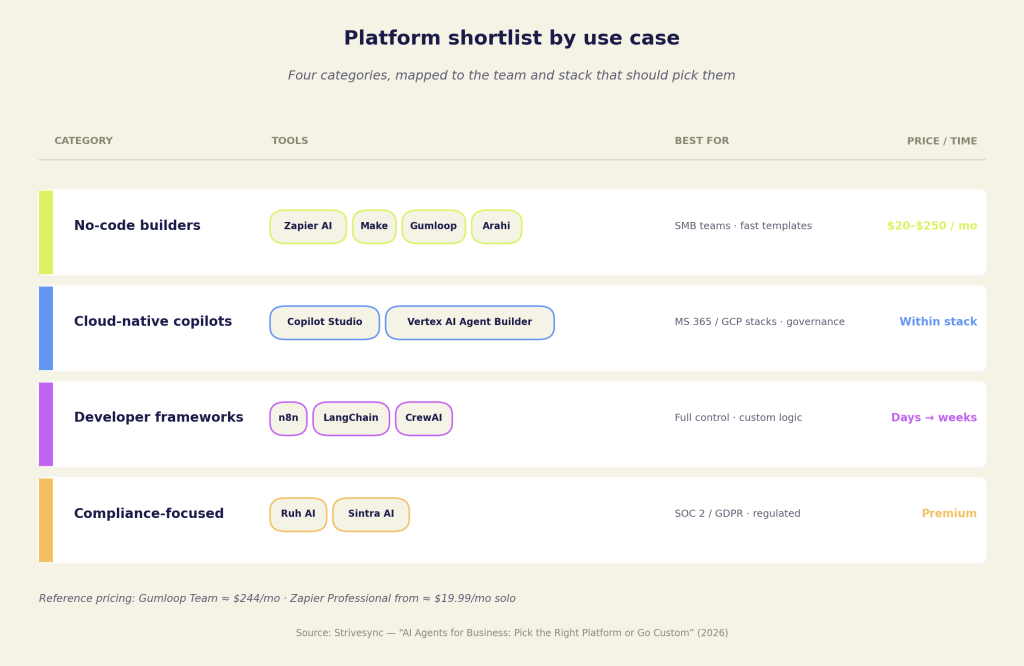
No-code agent builders (agent builders, no-code) are often the right starting point for many SMB teams. Zapier AI and Make offer visual workflow builders with broad integration ecosystems and pre-built templates. Gumloop provides an approachable builder and API-first options but with fewer native integrations than the biggest marketplaces. Arahi offers visual flows with template libraries. Pricing varies: Gumloop’s Team plan lists around $244 per month for ten seats; Zapier’s Professional tier starts near $19.99 per month for solo use. Expect generic tone out of the box, and plan for template limits as your use cases grow specific. If you’re evaluating no-code options, a good primer on a no-code AI agent builder can help you set realistic expectations.
Cloud-native AI copilots for business
If your business runs on Microsoft 365 or Google Cloud, the native options are worth serious consideration. Copilot Studio integrates directly with Teams, Outlook, SharePoint, and Dynamics. Vertex AI Agent Builder connects to BigQuery and the broader GCP ecosystem with built-in RAG and evaluation tooling. The security and data governance story is strong for both; the tradeoff is that they’re optimized for their own stacks.
Developer-first frameworks for ai agents for business
Developer-first frameworks like n8n, LangChain, and CrewAI give you flexibility and control over logic, observability, and deployment. The tradeoff is clear: you need engineers who know Python or JavaScript, understand LLM concepts, and can harden a system for production. First working prototype in days; production-ready system in weeks. Budget accordingly. For a broad comparison of available platforms, see this roundup of the best AI agent platforms.
Compliance-focused AI agent platforms
For compliance-heavy environments, Ruh AI advertises SOC 2 and GDPR posture with on-premise deployment options. Sintra AI takes the opposite approach, offering specialized pre-built agents for non-technical founders. Both tend to price above no-code builders, but they solve different problems.
Costs, skills, and what a realistic 30-day pilot looks like
Budgeting and skills
No-code AI agent platforms typically cost between $20 and $250 per month depending on seat count and run limits. Setup takes hours to a few days if you’re connecting existing apps, ingesting a knowledge base, and testing edge cases. The core skill requirement is logical thinking and basic data literacy, not programming. There is a ceiling: when your use case needs custom tone, complex integrations, or proprietary data, you’ll hit the template wall.
Engineering tradeoffs
Developer frameworks cost more upfront in engineering time. Expect weeks to go live once you add SDK work, vector stores, evaluation harnesses, and monitoring. Cloud compute is pay-as-you-go but rises with concurrency and memory at scale. The long-term maintenance burden can be lower than rule-based systems because well-designed agents adapt rather than break, but it depends on your use case and governance.
Running ai agents for business pilots: a 30-day plan
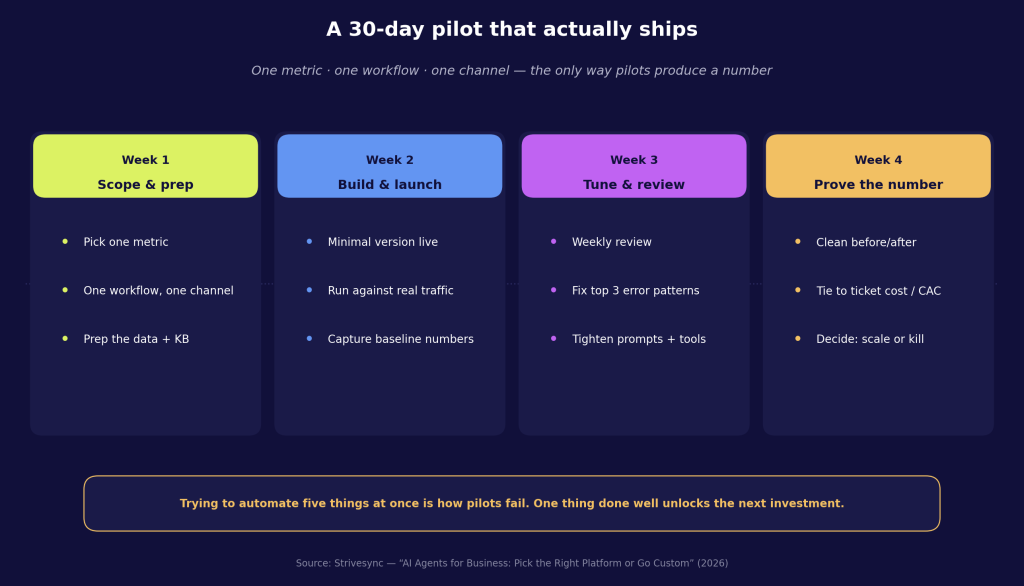
Keep a 30-day pilot tight in scope. Pick one metric, one workflow, and one channel. Prep your data, build the minimal version, run it against live traffic in week two, then review weekly against that single metric. Trying to automate five things at once is how pilots fail. One thing done well produces the number that justifies the next investment.
Benchmarks and ROI
Targets to consider: 70 to 85 percent automated resolutions for support, sub-60-second lead responses for sales, and a measurable lift in booked meetings. Tie those to cost per ticket, customer acquisition cost, and conversion rate. Compare clean before-and-after numbers to quantify ROI. If you want more real-world benchmarks and enterprise ROI examples, the linked case studies above provide useful context.
When to go custom vs. off-the-shelf
Choosing custom ai agents for business
Off-the-shelf platforms are fast and often good enough for generic workflows. If your support team handles standard FAQs in one language and your leads come through a simple form, a no-code builder can deliver most of the value quickly, often within a week.
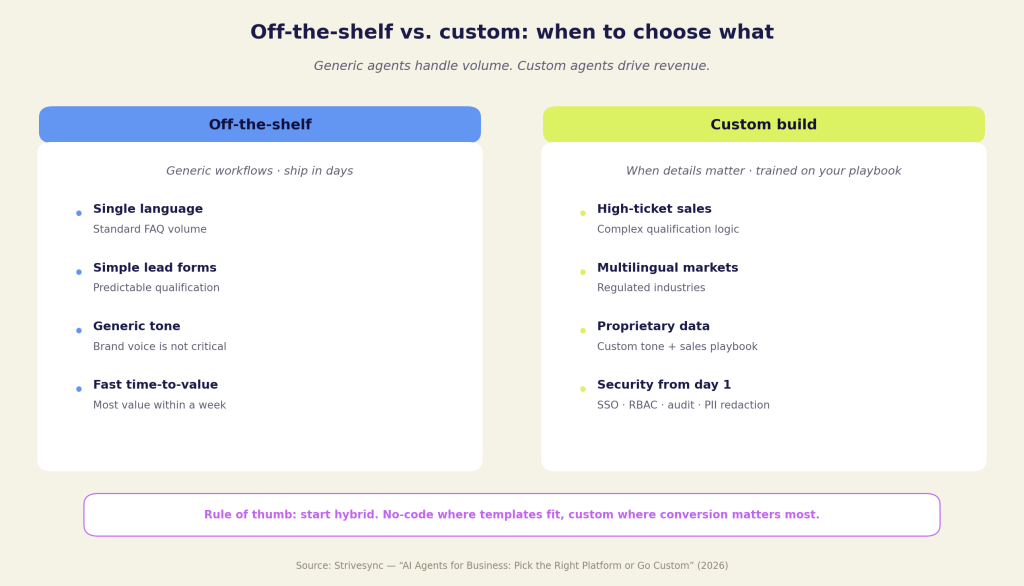
Custom builds win when details matter. High-ticket sales conversations, multilingual markets, regulated industries, and complex qualification logic benefit from an agent trained on your products, your tone, and your sales playbook. Generic agents handle volume. Custom agents drive revenue.
A typical delivery sequence for a custom build: discovery and data ingestion; retrieval and tool integration; guardrail configuration; evaluation and red-team testing; and a phased go-live with a rollback plan. Address security from the start, including SSO, RBAC, audit logs, PII redaction, and data residency controls your IT team can review.
Engagement models vary, but a low-risk approach includes a scoping call to define the use case, a sandbox demo so you can see agent behavior before committing, an initial build in days to a few weeks (depending on complexity), and a short live pilot with a single success metric.
If you’re ready to move from proof-of-concept to production, book a consultation with Strivesync. We’ll help you decide whether a no-code builder, a custom build, or a hybrid is the fastest path to value, and where ai agents for business should go first in your funnel.