
Most SMB owners know they should be investing in AI workflow automation to cut repetition and reduce costly errors. The problem isn’t awareness. It’s that they spend more time comparing tools than actually setting anything up. They read reviews, start a free trial, poke around the dashboard, and then go back to doing things manually because committing to a new system feels like a bigger lift than it’s worth.
At Strivesync, the first question we ask new clients isn’t which tool they use. It’s which tasks are slowing their team down the most. That question changes everything. Once you know exactly where the friction lives, picking the right tool becomes straightforward. Without that clarity, you can spend months automating things that weren’t actually the problem.
By the end of this article, you’ll know which workflows to automate first, which AI automation platforms fit your team’s technical level, and how to sequence your rollout so it sticks instead of falling apart.
What most businesses get wrong about intelligent workflow automation
The most common mistake is picking a platform before identifying what needs to be fixed. A business owner signs up for a tool because a peer recommended it, spends two weeks building automations, and then realizes they’ve automated things that weren’t actually slowing them down. Time spent, nothing changed. This happens constantly, and it’s not a technology problem. It’s a sequencing problem.
Effective AI workflow automation starts with a single honest question: where does your team lose time or drop the ball every week? That answer tells you exactly what to automate. Without it, you’re just adding complexity to a system that already has too much.
The second mistake is treating automation as a one-time project. Workflows shift as your business grows. You add new tools, hire new people, change your sales process. The businesses that get the most value out of automation treat it as a living system, something they revisit periodically, whether quarterly or semi-annually depending on their growth pace, and adjust as things evolve. A configuration you built nine months ago might be creating problems today without anyone noticing.
The workflows that deserve your attention first
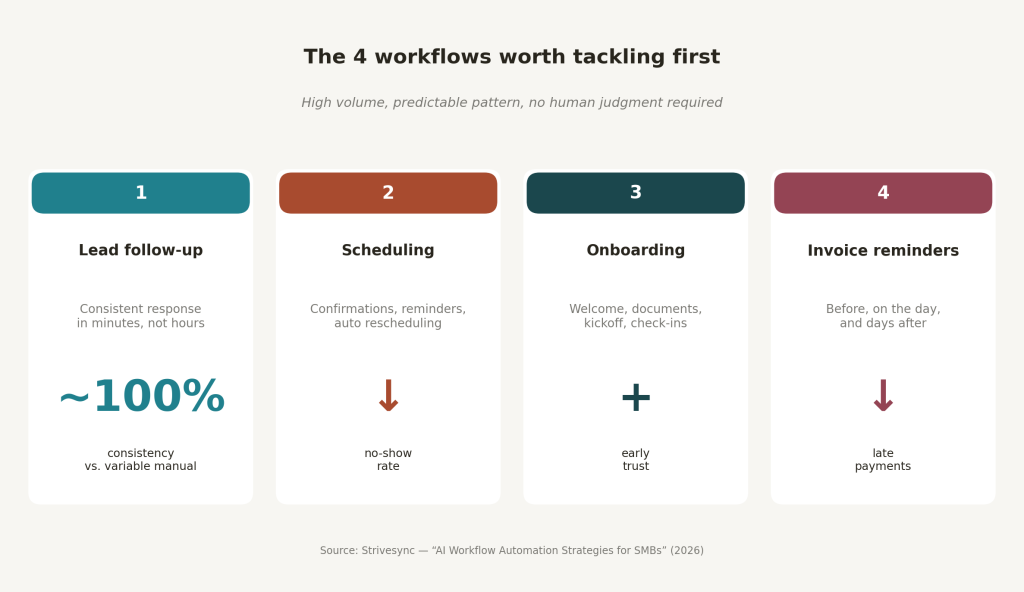
Lead follow-up is the highest-impact starting point for most SMBs. In our experience working across client accounts, automated follow-up consistently improves conversion rates compared to manual outreach, largely because consistency goes from wildly variable with humans to near 100 percent with automation. The faster a lead hears from you, the better your odds of converting them, research on response time shows that engaging a prospect within the first few minutes dramatically outperforms waiting hours or days. For evidence, see AI vs manual lead follow-up.
Appointment scheduling is equally valuable and often overlooked. Connecting a scheduling tool to your CRM so it confirms, reminds, and reschedules without manual input can reduce no-shows in many B2B contexts. For a service-based business handling a high volume of calls each week, even a modest reduction in missed appointments adds up fast.
Once a prospect converts, onboarding is where businesses lose momentum. A fragmented experience where the client doesn’t know what happens next kills early trust. Automating welcome sequences, document requests, kickoff call scheduling, and progress check-ins creates something that feels personal even when it’s fully automated.
Invoice reminders are the other piece worth tackling early. Timed reminders, sent before the due date, on the due date, and a few days after, can reduce late payments and remove the awkward manual follow-up conversation. Experimenting with reminder cadences to find what works for your client base is worth the effort. For service businesses, this is straightforward recovered revenue.
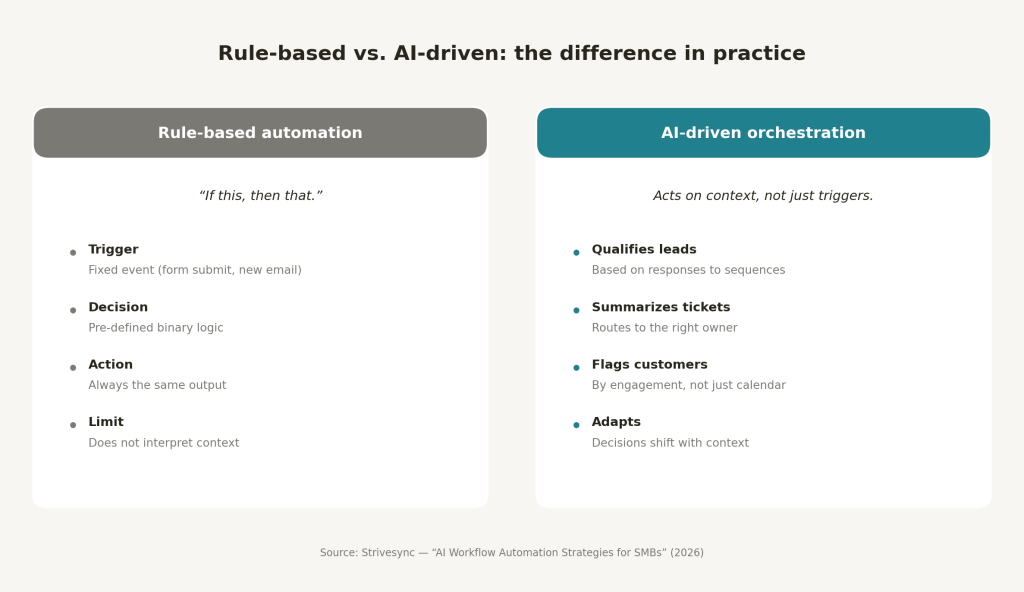
Basic rule-based automation follows a simple structure: if this happens, do that. AI-driven workflow orchestration goes further. It can qualify a lead based on how they responded to a sequence, summarize a support ticket and route it to the right person, or flag which clients are overdue for a check-in based on actual engagement signals. The difference is that AI acts on context, not just triggers.
AI workflow automation tools for SMBs
Beginner-friendly platforms
For most SMBs, Zapier and Make are the right starting points. Zapier connects over 8,000 apps and is widely regarded as the most beginner-friendly workflow automation software available. Most teams can have their first automation running in under an hour without writing a single line of code.
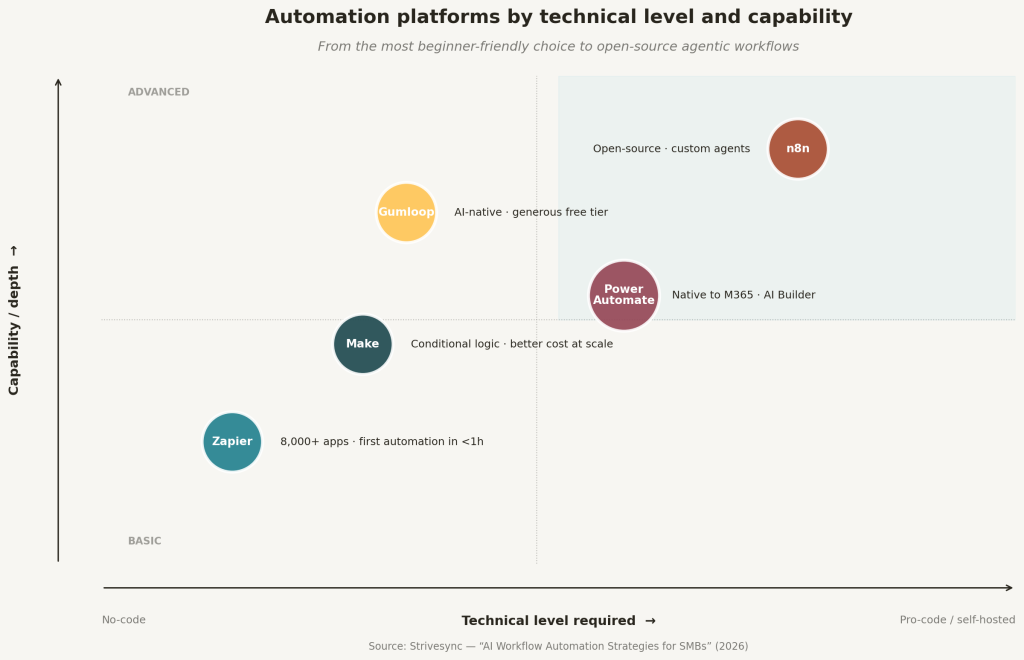
Make is more cost-effective at scale, handles more complex branching logic, and suits teams with slightly more technical comfort. If your onboarding sequences involve conditional paths, tier-based routing, or heavy data processing, Make handles that better than Zapier’s step limits allow. Both of these are solid low-code workflow automation options, the right choice depends on your volume and how complex your logic needs to be. For a quick comparison to help decide, see this Make vs Zapier guide. Zapier’s pricing rises quickly with task count, while Make’s credit-based model tends to be more forgiving for high-volume use cases.
AI-native platforms
Gumloop is worth considering if you want AI-native workflows without a steep learning curve. The interface is clean, the free tier is generous enough to experiment with, and it supports modern agentic workflows that older platforms weren’t designed for. It’s a strong option for teams that want AI built into the workflow logic from the start rather than bolted on as an afterthought. For a direct comparison, see this Gumloop vs n8n vs Vellum comparison.
Advanced and self-hosted options
As your workflows get more complex, especially if you want custom AI agents, proprietary data integration, or self-hosted infrastructure, n8n becomes the more serious option. It’s open-source, handles agentic workflows that would break simpler tools, and gives you automation depth that most no-code platforms can’t match. The tradeoff is a steeper learning curve. If your team has one technically capable person, n8n unlocks a different level of capability entirely. For businesses already in the Microsoft ecosystem, Power Automate integrates natively with M365 tools and includes AI Builder for document processing, which removes most of the integration friction. For a broader look at options, check out this overview of the best AI workflow automation tools.
How to map your AI workflow automation priorities before touching a single tool
Run a simple audit before you open any platform. Ask every person on your team what they do repeatedly that feels like a waste of their time. Look for tasks that happen more than once a week, follow a predictable pattern, and don’t require human judgment to complete. Those three filters will surface your first automation candidates quickly.
Rank them by volume and impact. A task that happens 20 times a week and takes 10 minutes each has far more automation value than one that happens twice a month. Focus your first sprint on the top three to five items on that list, not on everything at once.
In our work with SMB clients, businesses that try to automate too many things at once end up with nothing working well. Over-scoping is the most common failure mode in the first 90 days. Pick your highest-impact item, build it well, and prove the model before expanding.
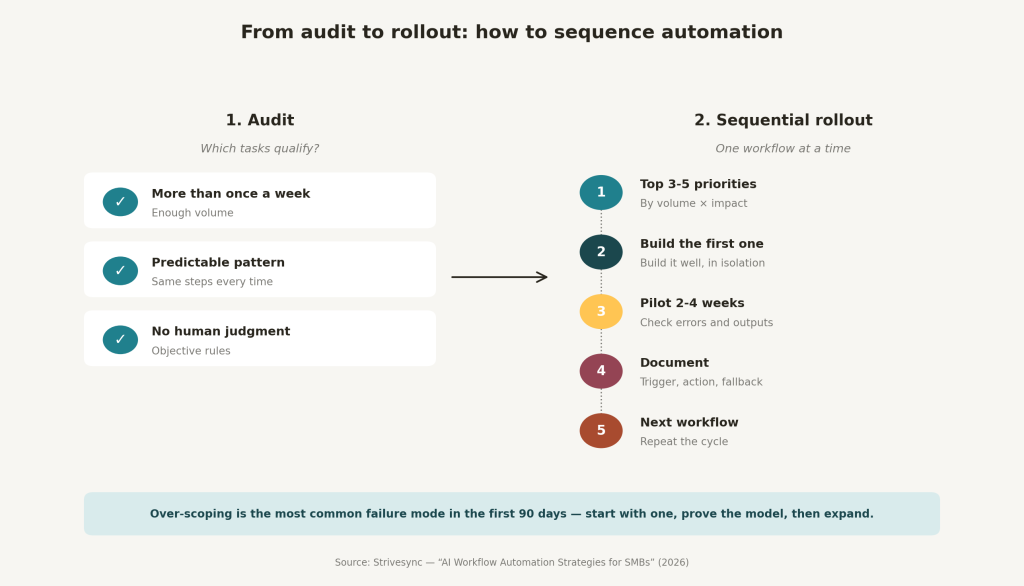
Sequence your rollout deliberately. Start with one workflow, run an initial pilot for two to four weeks, check for errors, and confirm it’s producing the right outcomes. Then add the next one. Document every automation: what triggers it, what it does, and what should happen if it fails. Most teams skip this step and spend hours debugging months later when nobody remembers how something was set up or why, a pattern the research on automation failure modes backs up clearly.
Why automation needs to feed your growth system, not run beside it
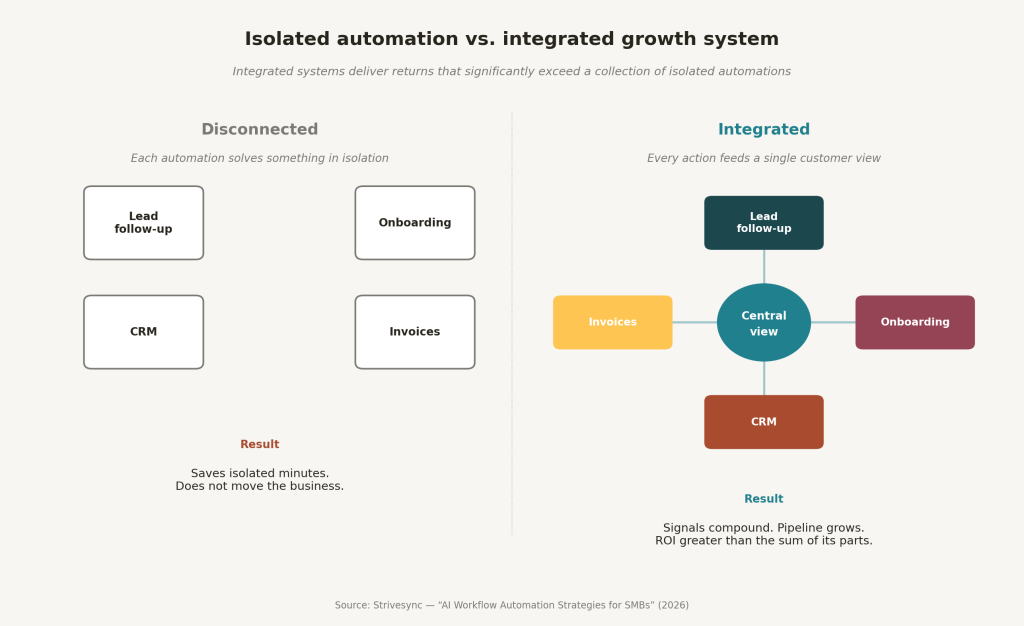
Most automation setups are a collection of disconnected triggers that each solve a small problem in isolation. Your lead follow-up doesn’t talk to your CRM. Your onboarding sequence doesn’t update your project management tool. Your invoice reminders aren’t connected to client health tracking. Each piece works in theory, but they don’t compound. The result is automation that saves individual minutes without moving the business forward in any meaningful way.
Studies on AI workflow automation ROI consistently find that well-implemented, integrated systems produce significantly higher returns than collections of disconnected automations. The businesses achieving strong first-year ROI aren’t getting those numbers from a few isolated Zaps. They’re getting them from systems where every automated action feeds data back into the same central view of the customer. When a lead engages with a follow-up sequence, that signal informs the sales team. When a client completes onboarding, it triggers a review request at exactly the right moment. That’s what AI-driven workflow orchestration actually looks like in practice.
At Strivesync, automation is built as part of a broader marketing and sales system, not as a separate layer on top of it. That distinction matters. The goal isn’t to remove humans from the process. It’s to make sure your team is spending time on the decisions that actually require them, while the system handles the rest. When automation is connected to a real growth engine, it builds pipeline. When it’s disconnected, it just saves a few hours per week and eventually gets abandoned.
Where to go from here
Implementing AI workflow automation for your SMB isn’t complicated if you approach it in the right order. Identify the friction first. Pick the tool that matches your team’s technical level. Automate one workflow at a time, and connect your automations to a central system rather than running them in isolation.
The businesses that benefit most from automation aren’t the ones with the most workflows running. They’re the ones with a clear picture of how each automated process serves the larger goal of acquiring, converting, and retaining customers. That clarity is what separates automation that compounds over time from automation that gets quietly turned off after three months.
Start with your highest-friction task. Get it working. Then build from there. If you want a team with hands-on experience building these systems across a wide range of businesses, Strivesync is worth a conversation. We don’t sell you a tool. We build the system.
FAQ: AI Workflow Automation for SMBs
What is AI workflow automation?
AI workflow automation is the use of artificial intelligence and automation software to execute repetitive business tasks, such as lead follow-up, scheduling, onboarding, and invoicing, without manual input. Unlike basic rule-based automation, AI-powered systems can act on context, not just fixed triggers.
Where should an SMB start with AI workflow automation?
Start with the task your team repeats most often that follows a predictable pattern and doesn’t require judgment to complete. For most SMBs, that’s lead follow-up or appointment scheduling. Get one workflow running well before adding more.
What’s the difference between Zapier, Make, and n8n?
Zapier is the most beginner-friendly and connects the widest range of apps, making it ideal for teams new to workflow automation software. Make offers more complex logic at a lower cost per task. n8n is open-source and designed for advanced, custom AI workflow engines, best suited to teams with technical resources who need full control over their automation infrastructure.
How do I know if my AI workflow automation is working?
Set a clear success metric before you launch each automation, time saved, conversion rate, no-show rate, or late payment rate, depending on the workflow. Run a short pilot period, review the results, and adjust before scaling. Revisit all active automations periodically to make sure they still fit your current process.
Do I need a developer to implement AI workflow automation?
Not for most workflows. Platforms like Zapier, Make, and Gumloop are built for non-technical users and offer low-code workflow automation that most business owners can set up themselves. More advanced use cases, custom AI agents, proprietary integrations, self-hosted infrastructure, may benefit from technical support.